

5 Best Tools for Students to Boost Productivity and Learning
 RenderCutCreator Tips
As a student, managing studies, assignments, and projects can sometimes feel overwhelming. Thankfully, there are tools designed to make these tasks easier and more efficient.
From note-taking apps to time management tools, these resources are perfect for making your academic journey smoother and more successful.
In this blog, we’ll explore five of the best tools that can help students stay organized, boost productivity, and enhance their learning experience. Let’s dive into these top picks that are sure to support your study goals effectively.
1. RenderCut – AI Video Editing for Students
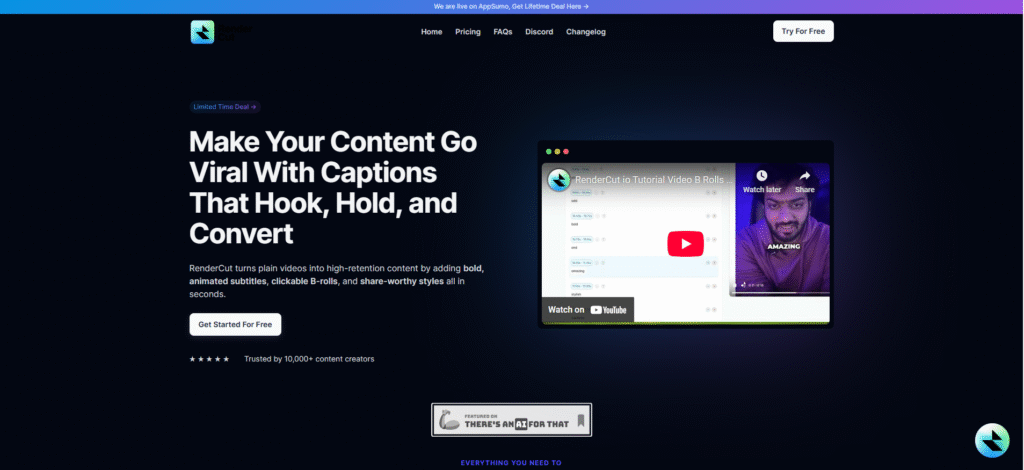
RenderCut is an AI-powered video editing platform designed for students to create professional videos with ease, including subtitles, animations, and export-ready formats for class projects and presentations.
RenderCut saves editing time and helps students deliver polished videos for academic use, class submissions, vlogs, or personal portfolios without needing complex tools or prior editing experience.
- Key Features:
- Automatic subtitle generation in multiple languages
- Customizable fonts and animations for personal or professional projects
- Easy integration with popular video-sharing platforms
2. Notion – All-in-One Workspace
Notion is an all-in-one productivity platform that integrates note-taking, task tracking, project planning, and collaboration tools into a single customizable workspace.
Students benefit from Notion’s flexible structure to manage notes, deadlines, and group projects without switching tools. It’s all-in-one design reduces mental clutter and helps maintain focus across multiple subjects.
- Key Features:
- Customizable templates for notes, to-do lists, and more
- Collaborative features for group projects
- Cross-platform sync for easy access on any device
3. Grammarly – Smart Writing Assistant
Grammarly is a digital writing assistant that checks grammar, punctuation, spelling, and clarity in real time, making your writing clean and professional.
Grammarly helps students submit error-free essays, assignments, and emails by catching grammar mistakes and offering suggestions for better sentence structure and tone, ensuring clear and credible academic communication.
- Key Features:
- Real-time grammar and punctuation checking
- Writing tone detection for essays and assignments
- Plagiarism checker for academic integrity
4. Trello – Visual Task Management
Trello is a visual project management platform that helps students stay organized by using boards, lists, and cards to plan, prioritize, and track academic tasks.
Trello gives students a simple visual structure to manage assignments, track progress, and collaborate on group work, reducing missed deadlines and boosting productivity.
- Key Features:
- Drag-and-drop task management with boards and cards
- Integration with apps like Google Drive and Slack for collaboration
- Due date reminders and checklists to stay on top of deadlines
5. Google Scholar – Research Made Easy
Google Scholar is a free and powerful search engine designed for academic research. It provides access to a vast collection of scholarly articles, books, conference papers, and theses, making it an invaluable resource for students at all academic levels.
- Key Features:
- Access to peer-reviewed papers, theses, and books
- Citation generation tools for academic writing
- Personalized research recommendations based on interests
People Also Ask (PAA)
What are the best productivity tools for students?
Tools like RenderCut, Notion, and Trello help students manage tasks and enhance productivity.
How can students improve their writing?
Using tools like Grammarly can significantly improve writing by providing real-time suggestions and corrections.
What are the best video editing tools for students?
RenderCut is a top choice for students who want to create professional videos with subtitles and custom animations.
Conclusion
In conclusion, these five tools – RenderCut, Notion, Grammarly, Trello, and Google Scholar – are game-changers for any student looking to boost their productivity, creativity, and organization.
Whether you’re managing tasks, improving your writing, or accessing academic resources, these tools have got you covered. Don’t wait any longer – start using them today to streamline your educational journey and unlock your full potential. Embrace the power of these tools and watch your efficiency and creativity soar!


