

5 Best Tools for Teachers
 RenderCutCreator Tips
As a teacher, having the right tools can transform the classroom experience and make learning more engaging. With the right resources, educators can streamline lesson planning, enhance student interaction, and foster a more productive learning environment.
In this blog, we’ll explore some of the best tools available to help teachers simplify their workflow, enhance their lessons, and connect with their students in meaningful ways. Let’s dive into the tools that can make a real difference in the classroom.
1. RenderCut – Revolutionizing Video Learning
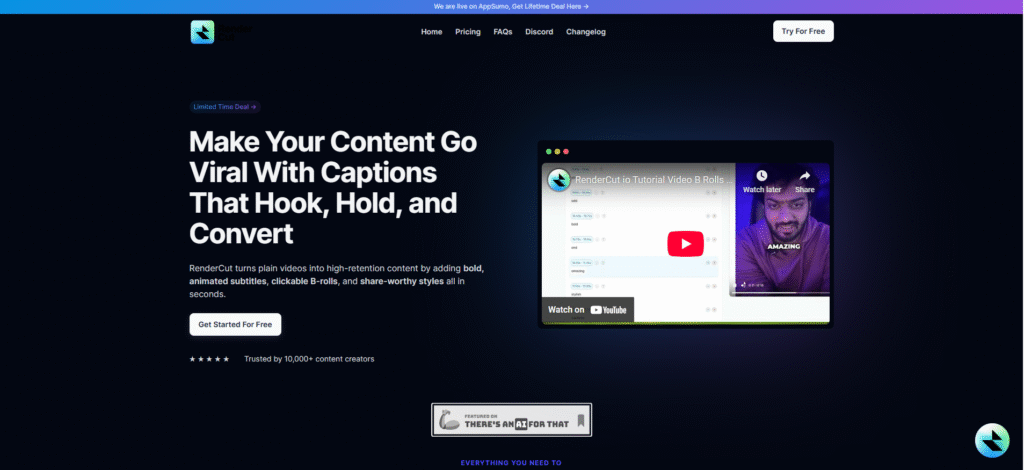
RenderCut is an AI-powered tool designed to automatically generate subtitles for educational videos, helping teachers enhance student engagement and content accessibility.
RenderCut makes educational videos more inclusive by improving accessibility for students with hearing impairments. It also helps non-native speakers follow lessons more easily. Teachers can quickly create professional-quality videos, saving time while maintaining high standards.
Key Features:
- AI-powered transcription for accurate and fast subtitles.
- Customizable subtitles that improve student comprehension.
- Multilingual support to cater to diverse classrooms and non-native speakers.
2. Google Classroom
Google Classroom is a free web service that simplifies assignments and collaboration between students and teachers.
It enables easy communication and file sharing between students and teachers. Google Classroom integrates seamlessly with Google Docs, Sheets, and Slides.
It provides a centralized space for assignments and student feedback, making it easy to stay organized. All course materials are stored in one location, ensuring quick access. It also supports remote learning, making it perfect for virtual classrooms.
Key Features:
- Easy communication and file sharing between students and teachers
- Seamless integration with Google Docs, Sheets, and Slides
- Centralized hub for assignments and student feedback
- Organized storage of course materials for easy access
- Supports remote and virtual learning environments
- Simple and user-friendly interface for teachers and students
3. Kahoot!
Kahoot! is an interactive learning platform that transforms lessons into fun and engaging games and quizzes.
It offers multiple-choice quizzes, polls, and challenges, along with real-time feedback and gamification elements.
It makes learning enjoyable and engaging for students, encourages active participation, and adds a competitive edge. Kahoot! is also great for quick assessments and revision sessions, making learning more dynamic.
Key Features:
- Interactive quizzes and games for learning.
- Real-time participation with up to 2,000 players.
- Customizable quizzes with various question types.
- Instant feedback and score tracking.
- Supports multimedia (images, videos, and audio).
- Multiplayer and team-based options.
- Available on the web and mobile apps.
- Engages students with fun, competitive gameplay.
4. Canva for Education
Canva is a graphic design tool that enables teachers to create engaging lesson materials, presentations, and posters effortlessly.
It offers thousands of free templates specifically for educational content, an easy-to-use drag-and-drop interface, and a collaborative feature for group projects.
Canva saves teachers time by simplifying the design process. It helps create visually stimulating materials that capture students’ attention. It’s perfect for designing worksheets, infographics, and classroom posters to enhance learning.
Key Features:
- Free access to premium Canva features for educators and students.
- Pre-designed templates for lesson plans, posters, presentations, and more.
- Real-time collaboration for students and teachers.
- Easy drag-and-drop interface for designing graphics.
- Ability to share and assign projects directly within the platform.
- Integration with Google Classroom and Microsoft Teams.
- Secure, ad-free environment for learning and creativity.
5. Quizlet
Quizlet is a tool that allows students and teachers to create digital flashcards and quizzes to help memorize important information.
Users can generate flashcards on any subject, study with games and tests, and track progress with study reminders.
It helps students study effectively by offering personalized, self-paced learning. The variety of study modes, including games and tests, keeps students engaged and motivated to learn.
Key Features:
- Flashcards: Create and study custom flashcards for any subject.
- Study Modes: Offers multiple modes like Learn, Match, and Gravity to enhance learning.
- Collaboration: Share study sets with classmates or study groups.
- Audio Support: Listen to pronunciations of terms for better retention.
- Mobile Access: Study on the go with the Quizlet app.
- Customizable: Tailor study sets to fit your needs and goals.
- Progress Tracking: Monitor your learning progress over time.
PAA (People Also Ask)
What is the best tool for teachers to create engaging lesson videos?
RenderCut is an excellent choice for teachers who want to add engaging subtitles to their lesson videos and make them accessible to all students.
How can Kahoot! Benefit teachers?
Kahoot! turns quizzes into fun games, helping teachers engage students in an interactive and competitive environment.
Can Canva help teachers with creating educational content?
Yes, Canva is perfect for teachers who need visually appealing and creative resources like worksheets, posters, and presentations.
Conclusion
The 5 best tools for teachers provide invaluable support in transforming classroom experiences. From interactive lesson plans to fostering student engagement, each tool enhances teaching efficiency and creativity. Whether you’re looking to simplify assessments or create immersive learning environments, these tools empower teachers to bring their lessons to life.
Explore these options today and see how they can make your teaching journey more effective and enjoyable. Embrace the future of education, and start making a difference in your classroom now!


